Live Reduction
A general description of the live reduction workflow is found in the User documentation, under Section Live Reduction.
Deployment
The steps to fully deploy the live reduction system are:
Update pixi environment
mr_reductionormr_reduction_qaby deploying a new version. If we are testing a new feature, we’ll be deploying the pixi environmentmr_reduction_qa.It may be necessary to update file /etc/livereduce.conf with the new version of the pixi environment. Contact Linux-support for this because the file is managed by the configuration management tool “puppet”. Let them know what the contents of the file should be.
After the pixi environment is updated, manually copy the post-processing file:
$ cp /usr/local/pixi/mr_reduction_qa/.pixi/envs/default/lib/python3.11/site-packages/mr_livereduce/reduce_REF_M_live_post_proc.py /SNS/REF_M/shared/livereduce/
This should be enough, as the livereuduction service will automatically pick up the new post-processing script. If after a few minutes, there seem to be no changes in the web monitor, try restarting the service:
$ sudo systemctl restart livereduce
Testing the Post-Processing Script with StartLiveData
To test the post-processing script reduce_REF_M_live_post_proc.py , we can use Mantid algorithm StartLiveData. It is necessary that the machine running this algorithm has write access to the /SNS/REF_M/ directory because the live reduction will write output files there. The analysis machines seem like a good candidate.
To familiarize yourself with the basic usage of algorithm StartLiveData, please read the Live Data User Interface webpage where you can find descriptions for most of its options.
In our case, you need to first activate the pixi environment mr_reduction and then start Mantid’s workbench
$ nsd-pixi-shell.sh mr_reduction

(mr_reduction)
$ workbench
Open the settings (File -> Settings) and under tab General,
set Facility to SNS and Default Instrument to REF_M.
Invoke the StartLiveData algorith with the following property settings:
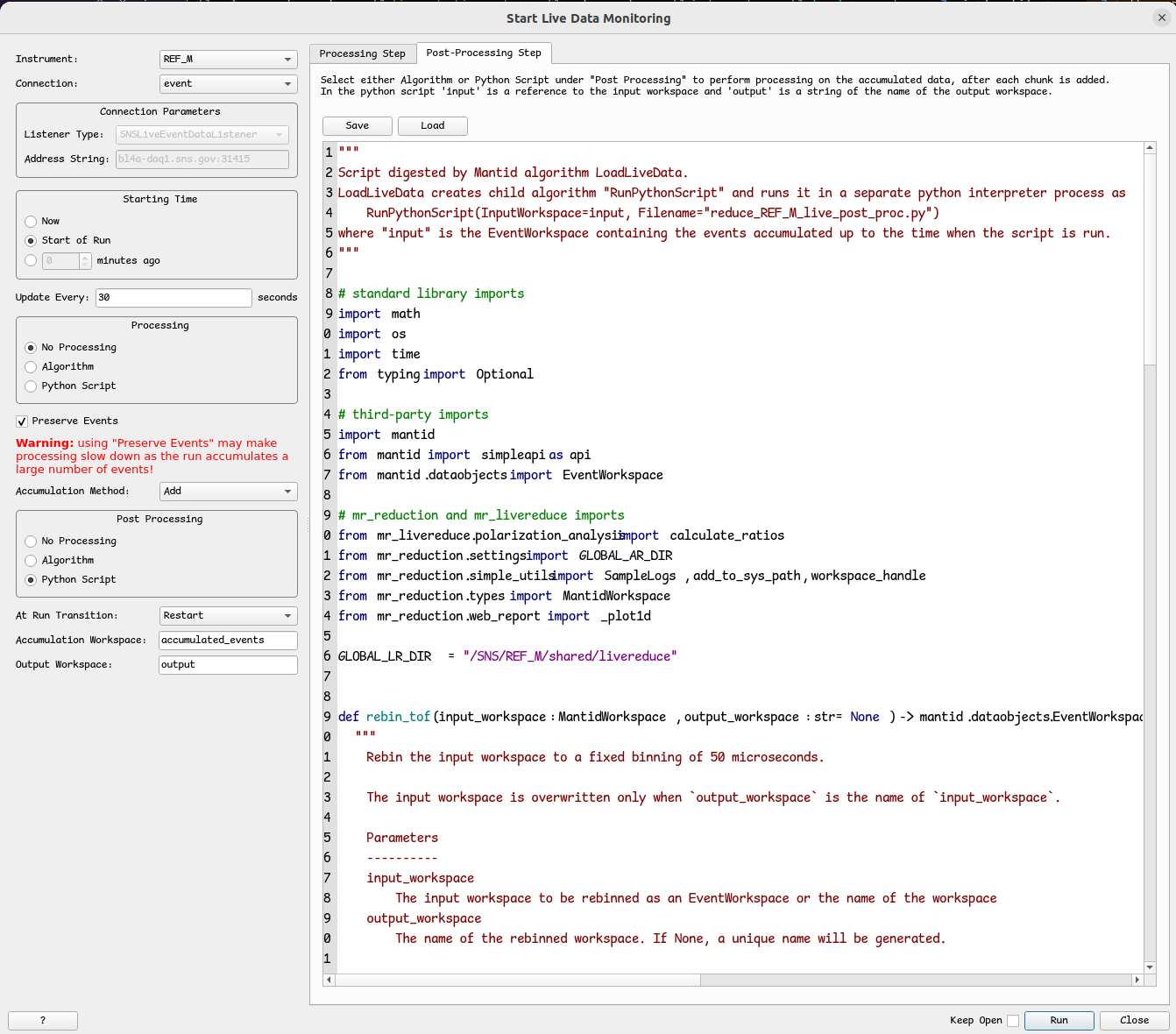
It is necessary that the local machine is connected to the network serving the machines at SNS.
In this scenario, the Connection Parameters will automatically set to SNSLiveEventDataListener
with the appropriate Address String.
Select Start of Run for Starting Time. This means that the first time we connect to the live data stream, we’ll collect not just the current chunk of events but all events since the beginning of the run. This is possible because the live data server stores all past events in a buffer.
Select No Processing for Processing. This means that we don’t apply any processing to the latest chunk of events.
By selecting Add for the Accumulation Method, we just add the latest chunk of events to the EventsWorkspace
containing all past events. We set the name of this workspace to accumulation_workspace.
If the current experiment happens to finish and a new one starts while we are connected to the live data stream,
we will erase all events from accumulation_workspace and start afresh.
This is what Restart for property At Run Transition means.
Select Python Script for Post Processing.
Then in tab Post-processing Step, click in Load and select script
reduce_REF_M_live_post_proc.py.
Better still, make a copy of this script and load the copy because we will need to modify it a bit.
We don’t want to pollute the canonical live-reduction directory with our post-processing so change line
GLOBAL_LR_DIR = "/SNS/REF_M/shared/livereduce"
to something like
GLOBAL_LR_DIR = "/tmp/my_livereduce"
and create the directory if it doesn’t exist.
Now it’s time to start the algorithm by clicking on Run.
The algorithm starts collecting events in the accumulation_workspace.
In addition, the algorithm starts executing the post-processing script
reduce_REF_M_live_post_proc.py and will do so every 30 seconds, as specified in property Update Every.
Whenever reduce_REF_M_live_post_proc.py finishes,
output reduction files are written to directory /SNS/REF_M/IPTS-XXXX/shared/autorereduce/,
where XXXX is the IPTS number of the current experiment.
In addition, log file livereduce_REF_M.log is created under /tmp/my_livereduce.
Errors may be written here and also in the Messages area of the workbench.
Live Reduction Watchdog
The live reduction service is in turn monitored by another service,
namely livereduce_watchdog.service.
The watchdog is meant to be a temporary patch against the observed stallings of livereduce.service.
It was observed that even if livereduce.service is running, it may not be actually doing anything.
The watchdog checks every few seconds if the log file /var/log/SNS_applications/livereduce.log
has been recently updated. This log is regularly written to by livereduce.service
and no updates is a robust indication that livereduce.service is stalling.
Service file livereduce_watchdog.service is to be deployed in the machine running livereduce.service,
while script livereduce_watchdog.sh
is to be deployed in directory /SNS/REF_M/shared/livereduce/watchdog/.
When the watchdog detects no updates in the log file, it restarts livereduce.service
while saving the last 20 lines of /var/log/SNS_applications/livereduce.log in
/var/log/SNS_applications/livereduce_watchdog.log.
Troubleshooting
Refer to the troubleshooting section Live Reduction